Cutting 40% of AR admin with AI-assisted workflows
Accounts receivable analysts were managing hundreds of accounts per cycle across disconnected tools. Every call left a trail of manual work. I redesigned the workflow to remove that overhead.
Team composition
TL;DR
Problem
AR analysts managed hundreds of accounts per cycle but spent a significant portion of that time on admin: switching between tools, writing call notes, setting manual reminders, and rebuilding context they had already gathered before the call. That overhead left less time for the actual collections work.
What I did
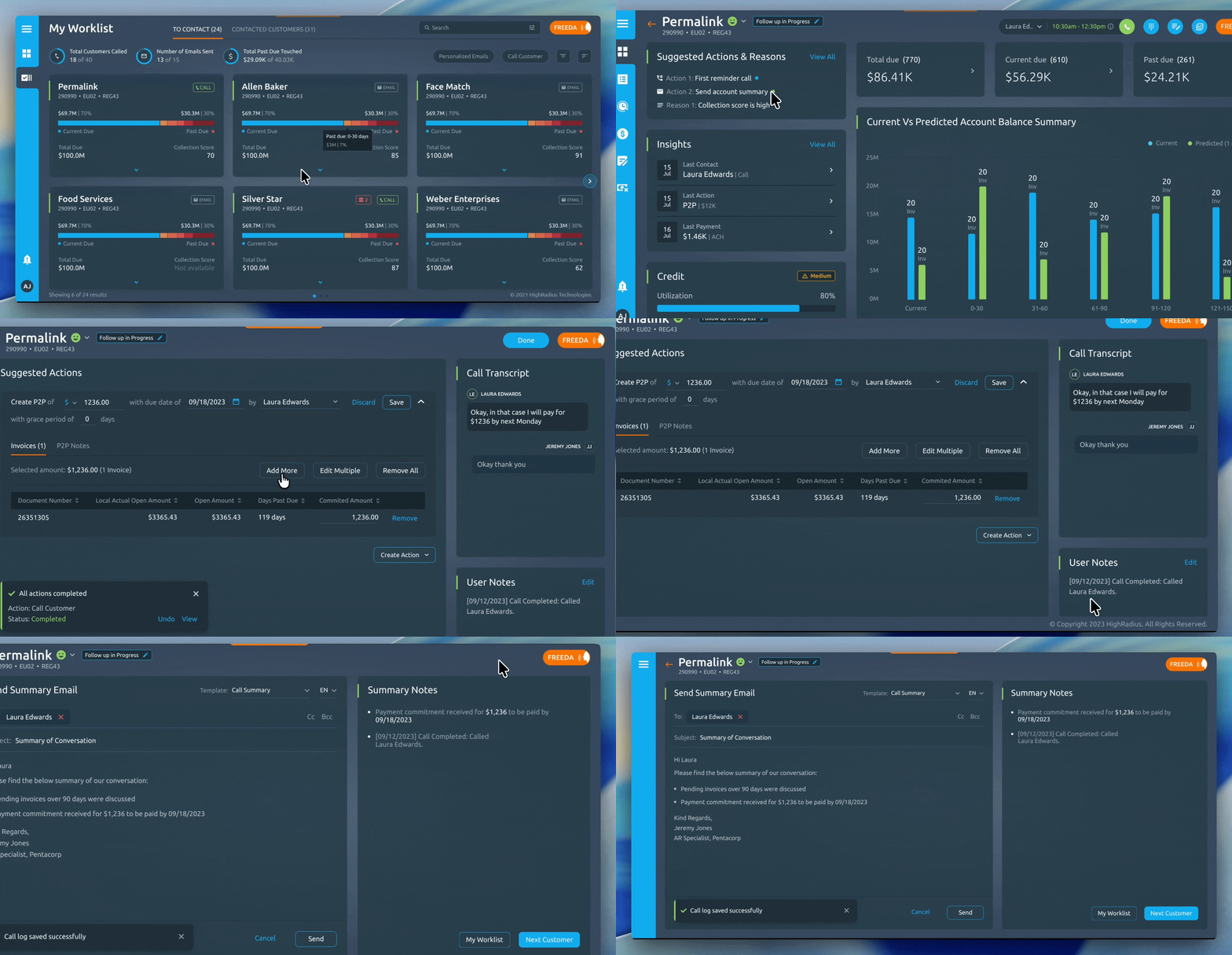
Redesigned the end-to-end collections workflow, unifying account preparation, calling, call logging, and follow-up scheduling into one continuous surface with AI-assisted summaries removing the manual write-up after every call.
Impact
Post-launch tracking showed 40% fewer missed follow-ups, 15% less manual effort per account, and a 13% reduction in days sales outstanding across the collections operation.

Opportunity
If analysts could move from finishing a call directly into a structured, partly pre-filled log, and have the follow-up tied automatically to the account, they would spend less time on admin and more time on the next account. The opportunity was not to make the product smarter. It was to remove the manual steps that were adding up across hundreds of accounts per cycle.
Concepts we rejected
A fully automated collections workflow where AI prioritised accounts and drafted outreach without analyst input: analysts were clear that they needed to feel in control of their worklist. A system that made decisions for them rather than surfacing information to help them decide would not have been adopted, and in collections, where relationship and context matter, full automation was not appropriate for anything beyond low-value accounts.
A new standalone tool to replace the existing CRM: the team was already working in established systems with years of account history. A replacement tool would have required data migration, retraining, and a change management effort that was outside the project scope and would have created resistance regardless of how good the design was.
A chat-based AI interface for querying account information: I explored whether an analyst could ask a conversational AI questions about an account instead of navigating structured screens. The problem was that experienced analysts already knew what information they needed. A chat interface added steps between knowing what you want and getting it. Structured screens with the right information surfaced by default were faster.
Challenge
Business context
Days sales outstanding is a core metric for any finance team. The longer it takes to collect on an invoice, the worse the company's cash flow. The collections team's job is to close that gap: contact the right accounts, at the right time, and follow up consistently until payment is received.
The business problem was simple to state. The team was not keeping up. DSO was higher than it should have been, and the root cause was not that analysts were working slowly. It was that the tools they were working with were adding overhead at every step of the process.

Who I was designing for
AR analysts are not casual software users. They work through a structured daily worklist, handling dozens of accounts per day. Every minute spent on admin is a minute not spent on a collection call. They are measured on outcomes: how much debt was recovered, how many follow-ups were completed on schedule, how quickly DSO came down.
They were not asking for new features. They were asking for less friction between the thing they needed to do and being able to do it.
Constraints
The existing CRM and accounting system integrations were fixed scope. The redesign had to work with the data those systems provided, not require a new data pipeline.
Analysts were resistant to tools that felt like monitoring rather than support. Any AI-generated content, whether a suggested call script or an automated summary, had to be editable and clearly presented as a starting point, not a directive.
The workflow had to support both high-volume low-value accounts, where speed matters most, and high-value strategic accounts, where context and relationship history matter more. The same interface had to serve both without being optimised only for one.
Call recording and automated transcription raised compliance considerations that determined what could be automated and what required explicit analyst review before saving.
Research
I spent time observing analysts working through their daily worklist before designing anything. What I saw was not a tool problem in isolation. It was a workflow problem expressed through tools: a browser tab for the CRM, a separate dialer, a spreadsheet for notes, and a calendar for follow-up reminders, all open at once.
I ran structured interviews with analysts across different account tiers to understand where the overhead was concentrated. Two themes surfaced consistently. First, the period between ending a call and logging the outcome was where context was most frequently lost, because analysts often moved to the next account before completing the write-up. Second, follow-up reminders set outside the workflow tool were regularly missed, because they had no connection to the account context when they fired.
I also spoke with team managers to understand how they monitored analyst performance and where they saw the most variability in outcomes. Inconsistent call logging was a recurring concern: different analysts recorded different levels of detail, which made account history unreliable for anyone picking up an account later.
What research changed
I went into the project expecting the core problem to be the calling experience: analysts were using a separate dialer, which felt like the obvious friction point to fix.
The research showed the call itself was not where things went wrong. Analysts were comfortable making calls. The breakdown happened in the ten minutes after: writing up what was discussed, deciding what the next step was, and setting a reminder that would actually surface at the right time in the right context.
That shifted the design priority from improving the call experience to improving everything that surrounds it. The call is the event. The prep before and the logging after are where the workflow was actually failing.
Design principles
Reduce the gap between finishing a task and recording it: the longer the gap, the more context is lost.
AI generates the first draft, the analyst owns the final version: automated summaries are a starting point, not a record.
Follow-ups should be tied to accounts, not to calendars: a reminder with no context is easy to ignore.
The workflow should work for both high-volume and high-value accounts: speed for one, depth for the other, same interface.
Never make analysts feel monitored: tools that feel like surveillance create resistance, not adoption.
Consistency in logging benefits everyone downstream: a well-structured call record is as useful to the next analyst on the account as it is to the one who made the call.
Strategy
Unify preparation, calling, and logging into one continuous flow
ShippedWhy: Analysts were rebuilding context three times for every account: before the call to prepare, during the call to reference, and after the call to log. Each switch between tools cost time and introduced the risk of losing what had just happened. A single surface that carried context through all three stages removed that overhead.

- Account summary, payment history, and previous call notes visible before and during the call
- Call outcome logging opens immediately after a call ends, pre-filled with account context
- Follow-up scheduling tied directly to the log, not to a separate calendar
Result: Analysts moved from call to log without switching context. The information they needed to write the log was already on screen. Follow-ups were set in the same action as completing the log.
Trade-off: A unified workflow means the design has to serve preparation, active calling, and post-call logging simultaneously. Those three modes have different information needs, which required careful thinking about what to surface at each stage without cluttering the others.
Business reasoning: Every minute an analyst spends rebuilding context is a minute not spent on the next account. At the scale of hundreds of accounts per cycle, that overhead compounds quickly.
Bring calling inside the product rather than alongside it
ShippedWhy: Using a separate dialer broke the workflow at its most critical point. The moment an analyst switched to a dialer, they lost the account context the tool had been showing them. When the call ended, they had to switch back, reconstruct what they had been looking at, and then write up what happened.

- In-app calling with account context, payment history, and previous notes visible during the call
- Call duration and connection status tracked within the workflow, not in a separate tool
- Call outcome state available immediately when the call ends
Result: Analysts no longer lost context mid-call. The information they needed to reference during a conversation was visible without switching screens.
Trade-off: Bringing telephony inside the product added a meaningful engineering dependency and introduced a new failure mode: if the calling integration had issues, it could disrupt the core workflow. That trade-off was accepted because the context loss from an external dialer was a daily cost, and a calling integration failure was a recoverable exception.
Business reasoning: A collections call is more effective when the analyst has account context in front of them during the conversation. Better calls produce better outcomes, which means faster recovery of debt.
Use AI to generate the first draft of call summaries
ShippedWhy: Manual call logging was the single biggest source of inconsistency in account records. Different analysts captured different levels of detail. Some logged immediately, others logged hours later. The information quality degraded as time passed. Automated summaries gave every analyst a structured starting point immediately after the call ended.

- AI-generated call summary presented for review immediately after call ends
- Summary is editable before saving, with analyst able to add or remove detail
- Structured format ensures consistent fields across all call records: outcome, agreed next step, amount discussed, payment commitment if any
Result: Call records became consistent across the team. Analysts who previously skipped detailed logging had a complete draft to confirm rather than a blank field to fill. Account history became more reliable for anyone picking up an account later.
Trade-off: AI-generated summaries are only as good as the call transcription they are based on. Calls with poor audio quality or heavy domain-specific language produced weaker summaries that required more editing. Analysts needed to understand they were reviewing a draft, not a record.
Business reasoning: Consistent account records reduce the time any analyst spends getting up to speed on an account they did not work previously. In a team where accounts are sometimes reassigned, that is a real operational cost.
Tie follow-up scheduling to the account, not to a calendar
ShippedWhy: Follow-up reminders set in a calendar fired with no account context. An analyst would see a reminder, not remember why they had set it, open a separate tool to find the account, and then begin rebuilding context before they could act. Reminders that are disconnected from context are easy to defer. Reminders that open directly into the account with the previous call summary visible are harder to ignore.

- Follow-up date and type set as part of call logging, not in a separate step
- Follow-up surfaces in the daily worklist at the right time with account context already loaded
- Previous call summary visible when the follow-up opens, so no context rebuilding is needed
Result: Post-launch tracking showed a 40% reduction in missed follow-ups. Analysts reported that follow-ups felt easier to complete because the context was already there when they needed to act.
Trade-off: The follow-up system only works well if call logging is completed consistently. If an analyst skips the log, the follow-up has no context. This created a dependency between two parts of the workflow that previously operated independently.
Business reasoning: Missed follow-ups are the most direct cause of extended DSO. An account that falls off the worklist because a follow-up was not set or was ignored is an account that takes longer to collect. Reducing missed follow-ups is the single most direct lever on the metric the business cares about.
Process & visuals


Results
How thinking changed during the project
I assumed at the start that the calling experience was the core problem. Analysts were using a separate dialer, which seemed like the obvious friction point. I expected the solution to be primarily about integrating telephony.
Observing analysts working showed something different. The call itself was the part of the workflow they were most comfortable with. The breakdown happened before and after: the scramble to pull up account context before dialling, and the manual write-up and reminder-setting that happened after hanging up.
That shifted my focus from the call to everything surrounding it. Integrating telephony was still important, but it was one piece of a larger problem about context continuity across a three-stage workflow.
How this scales beyond collections
The pattern that came out of this project, a continuous workflow that carries context through preparation, action, and follow-up, is not specific to AR collections. It applies to any role where someone works through a structured list of accounts or cases, takes an action, and needs to record and schedule a next step.
The AI summary approach is also reusable. The same principle of generating a structured first draft and letting the user confirm rather than create applies to any workflow where note-taking is currently a manual bottleneck.
Reflection
The most important decision in this project was to observe before designing. I could have assumed the calling friction was the problem, built a solution around it, and shipped something that improved one step without addressing the workflow as a whole. The observation sessions prevented that.
The hardest part of the design was making AI-generated summaries feel trustworthy without feeling authoritative. Analysts needed to see them as a draft to edit, not a record to accept. Getting that framing right in the interface, in the language, in the editability of the content, took more iteration than I expected.
If I were doing this again, I would spend more time with team managers at the start of the project. Their perspective on where variability was costing the business most would have helped me prioritise the logging consistency problem earlier, rather than discovering it through the analyst interviews.