Designing trust into an AI assistant before it goes live
Businesses wanted to use Kai to handle customer support. But they had no way to check if it was ready before switching it on. I designed the solution.
Team composition
TL;DR
Problem
Businesses wanted to use Kai for customer support but had no way to verify it was ready. Every test required engineers, a separate environment, or deploying blind.
What I did
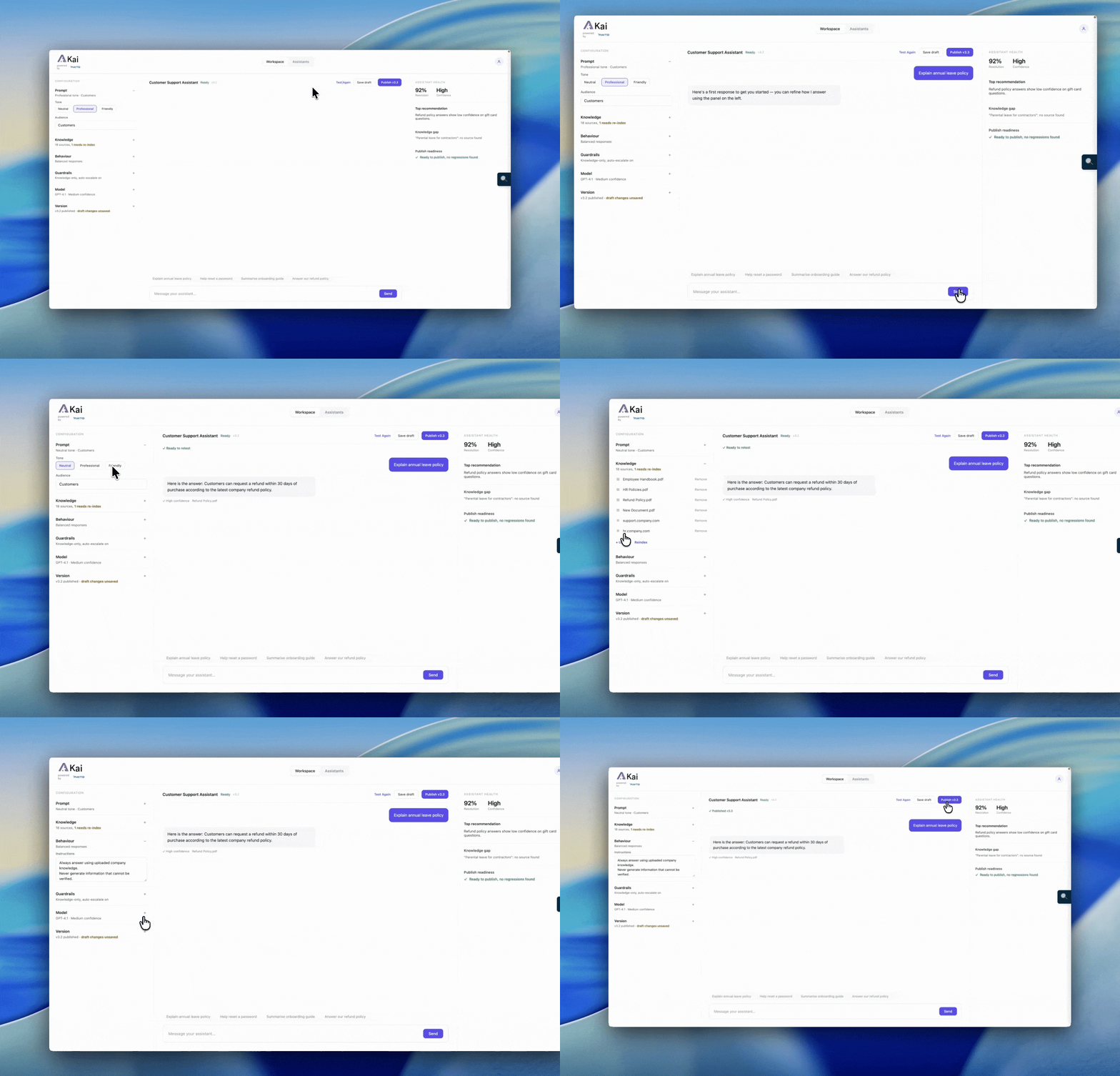
Built a live test window into every part of setup. Change something, see the effect immediately, before anything goes live.
Impact
Stalled deals moved forward. The question shifted from 'what if it gets it wrong?' to 'let me check right now.'

The AI worked. Nobody could verify that before going live.
In every sales meeting, the same question came up: "What happens when Kai gets it wrong?" Companies weren't questioning the AI. They were asking how they'd know it was safe before going live.

The product
Kai Voice — the AI assistant in active listening mode. This is what businesses were deploying to their customers. The orb pulses when it is processing. The waveform confirms it is hearing the right things. The question every enterprise buyer was asking was simple: how do I know it is ready before a real customer sees this?
Opportunity
The gap wasn't a missing AI feature it was a missing sense of safety. Every competitor treated testing as a pre-demo activity in a separate environment. Nobody had made it part of daily setup. That was the opening.
Concepts we rejected
A separate Playground tab: the earliest concept put testing behind its own navigation tab, isolated from the config screens. It looked clean but recreated the exact problem we were solving. Teams would still switch context to test, meaning they would skip it under pressure. Testing needed to be where the change was made, not one tab away.
A separate testing environment: we considered keeping testing isolated, but that recreated the exact problem we were solving. Teams would still need to switch contexts, and the friction would mean they'd skip it.
A test button on the instructions screen only: simpler to build, but any change to training content or tone rules would be invisible. Problems introduced outside instructions would only surface in production.
A manual QA checklist before go-live: this puts the burden on teams to remember steps. Research showed people don't follow checklists under pressure. The test needed to be present at the moment of change, not at the end of a process.
Product hypothesis
We believed: Companies weren't afraid of AI. They were afraid of finding out it didn't work in front of a real customer. Give teams a safe way to check before going live, and they'll move forward with confidence.
If we: we built a live test window directly into the setup experience, visible every time someone made a change,
Then: teams would feel confident going live, and stalled deals would move forward,
Because: the answer to 'what happens when it gets it wrong?' would no longer be 'we find out when a customer tells us.'
Risks
- Teams might feel they need a third party to sign off on test results, not trusting their own findings.
- A test window available everywhere could be ignored if it isn't surfaced at the right moments.
Challenge
What is Kai?
An AI assistant platform that lets businesses deploy a customer-facing chatbot answering support queries, qualifying leads, routing customers without engineers.
Backed by Global Enterprises
British Council runs Kai across 100+ countries. Their adoption, alongside $3M+ in enterprise revenue, confirmed that high-governance organisations could deploy AI without depending on technical teams.

The Problem
Every change updated instructions, new content, adjusted behaviour had no visible effect until the assistant went live. For teams responsible for customer satisfaction, deploying blind wasn't an option.

What Research Showed
8 interviews with enterprise customer support leads. Every session came back to the same question: "What happens when Kai gets it wrong?"
3 out of 4 companies in advanced talks had paused at exactly this point.
Five Roles, One Workspace
Trainer, ops manager, IT admin, viewer, super admin each with a different definition of ready to go live. The design had to serve all of them without adding a separate flow for each.

The Gap Nobody Had Closed
Every competitor treated testing as a separate pre-demo activity. Nobody had built it into the daily setup experience. That was the opening.

30 Questions. 3 Priorities.
Research produced 30 design questions across 6 areas. Testing had the highest density of MVP tags people weren't asking for more features, they were asking for confidence before going live.
Three themes shaped everything: reduce cognitive load on first use, build confidence through real-time testing, introduce advanced controls progressively.

How We Worked
Discover: NotebookLM + AI tools for research synthesis. Define: Gemini for ideation and UX planning. Develop: Figma Make, Figma Design, AI prototyping tools for concepts and explorations. Deliver: production-ready code.
Team composition
What Kai automates
Design principles
Let people check before they commit: a test window right next to every setting removes the fear of going live.
Catch problems where they're made, not where they land: a bad change should show up in testing, not in a customer conversation.
No extra steps: if testing requires saving, reloading, or filing a ticket, people won't do it.
Different people, different trust levels: a trainer uploading content and a manager approving go-live need different access, for good reasons.
Talk like the person using it: avoid AI jargon. Say what happens, not how it works under the hood.
Make 'what if it goes wrong?' a question you can answer, not one you dread.
Constraints That Shaped The Solution
The core tension throughout: give the AI enough capability to be genuinely useful, while keeping control, safety, and human escalation firmly in place.
Accuracy and hallucination prevention came before response creativity.
Data privacy, security, and auditability were non-negotiable for enterprise buyers.
Had to integrate with existing CRM and channel systems (Salesforce, HubSpot, WhatsApp, Email), not replace them.
Had to stay no-code configurable for business users, not just engineers.
LLM usage cost had to scale sustainably across many customer accounts, not just one pilot.
When Kai Escalates To A Human
Customer sentiment turns negative or frustrated.
AI confidence in its own response falls below a defined threshold.
A customer explicitly asks for a human.
Sensitive account actions require verification.
The query is complex, regulated, or requires business judgement.
Multiple attempts have already failed, or a sales opportunity needs a human rep.
Strategy
Phase 1: Creating and managing AI assistants
Get to a working assistant in one session, not one week
ShippedWhy: First-time users had one goal: see whether Kai could handle their real questions. Too many setup steps before testing meant losing confidence before reaching the value. The Playground had to be the first thing visible.

- Playground is the default landing screen, showing a live test conversation immediately on first load
- Assistant creation is a single named step, not a multi-page wizard
- Suggested prompts surface common queries so users can test without writing their own
- Recent conversations are saved automatically so teams can return to previous tests without starting over
Result: Users could ask their first real question within 60 seconds. The Playground became the proof point that closed deals, not a feature discovered later.
Trade-off: Showing the Playground before full configuration means answers come from a limited base. We accepted that trade-off: a fast partial answer builds more trust than a perfect answer hidden behind setup.
Business reasoning: Sales teams demoed Kai live. A fast path to the Playground meant the demo happened inside the meeting, not after.
Phase 2: Training and testing your assistant
Make training and testing one continuous loop, not two separate steps
ShippedWhy: Teams uploaded knowledge files, then navigated away to test. That gap meant bad content was invisible until a customer surfaced it. Training and testing had to happen in one place.

Alternatives Considered
- Test only after publishing: simpler to build, but a bad knowledge upload would reach customers before anyone caught it.
- A separate QA environment: recreated the context-switching problem. Teams would skip it under time pressure.
- Knowledge sources, training files, and training links are visible in the sidebar alongside the live test window
- Ready for testing status updates automatically when sources are connected and indexed
- View Knowledge and Test Again actions sit directly in the Playground, not on a separate screen
- Training file count and link count are surfaced at a glance so teams know what the assistant is working with
Result: Teams could upload a document and test it in the same session. Bad content was caught before it reached a customer.
Trade-off: Real-time indexing status required additional backend work. We prioritised it because silent failures teams assuming content had loaded when it hadn't were a worse outcome.
Business reasoning: Support teams were blamed for wrong answers after knowledge updates. The issue wasn't the AI it was no way to verify before going live. Fixing that eliminated a recurring escalation.
Phase 3: Operating AI at scale
Give teams the confidence to publish, not just the button
ShippedWhy: Publishing is a risk decision, not a technical one. Enterprise directors needed evidence the assistant was ready not just a Publish button.

- Assistant Health panel shows resolution rate and confidence score in real time before publishing
- Knowledge gap alerts surface specific queries the assistant cannot answer, with the source identified
- Publish readiness check confirms no regressions found since the last version
- Version control shows the current published version and allows rollback without engineering support
- Guardrails configuration lets teams define when Kai auto-escalates, without writing code
Result: Directors approved publish decisions on data, not gut feel. The question changed from 'is it ready?' to 'health panel says 92% resolution and no regressions let's go.'
Trade-off: Visible confidence scores and knowledge gaps initially read as failures to some stakeholders. Reframing them as early warning signals shifted the conversation.
Business reasoning: Enterprise procurement required documented pre-production validation. The health panel and readiness check provided that audit trail unblocking two deals stalled on governance requirements.
Business impact
Deals moved forward
- 3 out of 4 companies that had paused, all stuck at the same question, moved forward once they could test the assistant themselves before going live.
Better AI performance
- 22% more customer queries resolved by the AI after launch, because teams could find and fix problems before going live instead of after.
Faster for customers
- Customer queries handled in 45 seconds on average. Teams could update the assistant's behaviour and test it themselves. No engineering ticket needed.
A tool people actually use
- 250,000+ test sessions run every month. The test window became part of how teams work, not a feature they ignore.

Success Metrics We Defined
Tracked from launch
- Support ticket reduction
- First response time
- Successful query resolution rate
- Task completion rate
- Customer Satisfaction (CSAT)
- AI adoption rate
- Human escalation rate
- Lead generation and lead conversion
- Customer engagement and sentiment analysis
Defined but dependent on CRM integration
- CRM conversion rates, sales pipeline progression, and campaign attribution, available once Kai is integrated with Salesforce or HubSpot.
Also part of the KPI framework
- Average resolution time, AI containment rate, qualified leads generated, customer retention, agent productivity, and cost per support interaction.
Process & visuals


Results
Early Explorations
Early concepts surfaced training files, tokens, and message counts alongside the knowledge base. Testing showed most of it was noise. Users wanted to check the assistant worked, not manage its capacity.
Access and Roles Exploration
An early exploration of user management exposed how complex multi-org permissions could become. It led to the decision to introduce role access progressively, not upfront.

The Test Window in Practice
Change an instruction, see the effect. Upload a document, test it. Adjust tone or escalation rules, check immediately. Same place, every screen, no extra steps.

What Shifted in Sales
The question didn't go away. The answer did. From 'we'll find out' to 'let me show you' the conversation moved from risk to readiness.
What I'd Do Next
Automate test runs on every update. Build shared test sessions for the person who knows edge cases and the person who signs off. Create a library of common test scenarios so teams don't start from scratch.
What I Learned
The problem wasn't making the AI smarter. It was giving people a safe place to check before it mattered.
I'd bring access levels in from day one. Adding them late made the permission model feel bolted on rather than designed in.